 Product case studySchool management software
Building EduTig: The Whole School in One Record, at a Published Price
Pakistani private schools run on registers, Excel workbooks and WhatsApp, and the software sold to replace them is often quoted rather than priced, sold in modules, and set aside once the office finds the register easier. This is what we studied, and what we built in response.
- Capabilities on every plan
- 92
- Role-based portals
- 5
- Students on the free plan
- Up to 100
- Individual permissions
- 185
The case in three lines
The problem
Admissions, attendance, fees and parent contact live in separate registers, workbooks and phones, so the same student is typed again in every file and nobody can state the school's fee position. The software on offer usually prices by quote or by module, and leaves messaging, setup and migration outside the headline number.
Our approach
One integrated record for the whole school, every capability on every plan, prices published per school per month, a free plan for schools of up to 100 students, a web app with nothing to install, and notifications on WhatsApp, SMS, email and in-app through the school's own provider account.
What it changes
EduTig is live with four published plans, from free to $39.99 a month per school. It ships 92 capabilities from admissions to payroll, five portals behind one login, 185 permissions and 20 notification events.
If the paper register is easier than the software, the software loses. Every screen in EduTig is designed to beat the register on a busy school morning.
What we studied before writing code
We started with the school year, not a feature list. A private school office in Pakistan runs on a fixed rhythm: an admissions season in which inquiries arrive by walk-in, phone call, referral, Facebook and WhatsApp; a daily register that has to be marked first thing in the morning; a monthly fee run; a monthly payroll that depends on staff attendance and leave; and exam weeks that end in report cards and a result day. In a school that runs on registers and spreadsheets, each of those cycles keeps its own copy of the same students, and the copies drift apart.
Fees got the most attention, because fees decide whether a school pays its teachers on time. Most families pay monthly, but not every charge is monthly. Annual charges, per-term charges, admission fees and one-time fees fall in specific months; sibling and staff concessions apply to some fee heads and not others; fines and arrears carry forward. Collection runs through cash at the desk and bank transfers that someone has to match to a student by hand. A generic invoicing tool, or a system designed for another market, bills the wrong amounts in the wrong months, and the accounts office goes back to its workbook.
We then priced the alternatives the way a school pays for them. Fedena, the category veteran, publishes yearly plans from $999 to $1,699, with an Enterprise tier priced by contacting sales, and its own site says the final cost depends on add-ons such as SMS, the mobile app, biometric devices, vehicle tracking and payment gateways. Classe365 publishes a $100-a-month core for schools of up to 100 students, sells modules including fee and invoicing at $75 a month each, and shows no prices above 100 students. Both are established products with long track records, and Fedena publishes more than most of the market. Across the category, quotes resolve to three models (per student per month, a flat monthly package, or a one-time license with annual maintenance), and the costs that decide the total sit outside the first number: messaging, setup, data migration, and the module a school assumed was included. Our Fedena alternatives comparison sets out the published figures in full.
Finally, we looked at how schools reach parents. Families read WhatsApp and SMS; many guardians have no email address, and a parent who has to install an app first often never does. In many schools, communication runs through teachers' personal phones and class WhatsApp groups, with no record of what was sent to whom. A product that depended on parents adopting a new channel would fail at the moment that matters most to the school: the fee reminder.
- 01Mapped the operating calendar of a private school office: admissions season, the daily register, the monthly fee run, monthly payroll, exam weeks and result day.
- 02Traced each workflow through the registers, Excel workbooks and phones it runs on, and marked every point where the same data is typed twice.
- 03Read the published pricing pages of Fedena, Classe365 and the open-source editions (Project Fedena and openSIS) as of October 2026, and listed what sits outside each headline price.
- 04Priced ownership the way a school pays it: license, add-on modules, messaging, setup, data migration and the cost of leaving.
- 05Reviewed the channels parents already use (WhatsApp, SMS, phone calls and the printed fee voucher) and which of them reach a family with no email address.
- 06Modeled the fee structures schools bill: monthly, quarterly, annual, per-term and one-time charges, sibling and staff concessions, fines and arrears.
What customers were struggling with
The same student, typed again in every file
An admission form is copied into the student register, then the fee workbook, then the class register, then the exam sheet. Every copy is a chance for a misspelled name or a missing sibling discount, and a correction in one file never reaches the others.
A fee position nobody can state
Concessions, arrears and partial payments live in a workbook that one person understands. The defaulter list runs days behind the bank, so the office calls parents who have already paid and misses some who have not.
Parents reached by whoever remembers
Absence alerts, fee reminders and results go out from personal phones and class groups when someone has time. Families without email are missed, private matters land in groups, and nobody can say afterward what was sent.
A quote that is not the price
The headline figure leaves out SMS, the parent app, the fee module, setup and migration. Per-student pricing raises the bill with every admission, which charges a school more for the growth it is working toward.
Software that loses to the register
When a system cannot bill the school's own fee structure, or support is not available during school hours, the office keeps a side register to be safe. Within a term the side register is the system again, and the software is a cost with no users.
Payroll arguments at month end
Deductions are worked out by hand from a late register and a leave file. Staff contest them because the rules for lateness, half days and paid leave were never written down, or were applied differently by whoever kept the register that month.
Where existing tools fall short
The calls we made, and what they cost
- 01
Every capability on every plan
We do not sell modules. Starter and Enterprise run the same product, from admissions to payroll, and the tiers differ only by school size and the support that comes with them. The trade-off is revenue: we give up the upsell that module pricing creates. In return, a school never discovers mid-year that fees or the parent portal cost extra, and no sales conversation is spent on module arithmetic.
- 02
Prices published in full
Every plan's price is on the page, per school per month, with no quote request and no setup charge. Publishing removes the room to price each school by negotiation, and competitors can see our numbers. We accept both, because a school owner comparing systems can check ours in a minute, and because a quote wall costs the buyer time before it costs the vendor anything. Prices are in US dollars, so a school's rupee bill follows the exchange rate, and we state that up front.
- 03
A free plan that is the whole product
Starter is free for schools of up to 100 students and includes all 92 capabilities and all five portals, with email support. A free tier costs us hosting and support with no revenue attached. We built it because the smallest schools are where registers and spreadsheets win on price, and a free plan that worked as a demo would not change that. A school that grows past 100 students moves to a paid tier on the same system, with its records already in place.
- 04
A web application, not a native app first
EduTig runs in a browser on phones, tablets and computers, so there is nothing for a parent to download before seeing fees and homework, and one codebase serves every device. The cost is lock-screen push notifications, which EduTig does not send today; mobile push is on our roadmap. Until then, urgent messages go by WhatsApp and SMS, which parents check anyway, and every portal has its own in-app inbox.
- 05
The school owns its channels and its data
SMS and WhatsApp go out through the school's own provider account, so the school pays the provider's rate directly and controls its messaging budget. The trade-off is a setup step and a second bill for the school, and no messaging margin for us. If a school leaves, we export its data for it with no exit fee. That removes lock-in as a retention tool, which is deliberate: schools should stay because the product works for them.
From pain point to product
One record instead of a copy per register
An integrated student and staff record that admissions, attendance, homework, exams, fees, payroll, library and transport all read, with bulk student import from Excel or CSV that reports each bad row.
Admissions that do not lose families
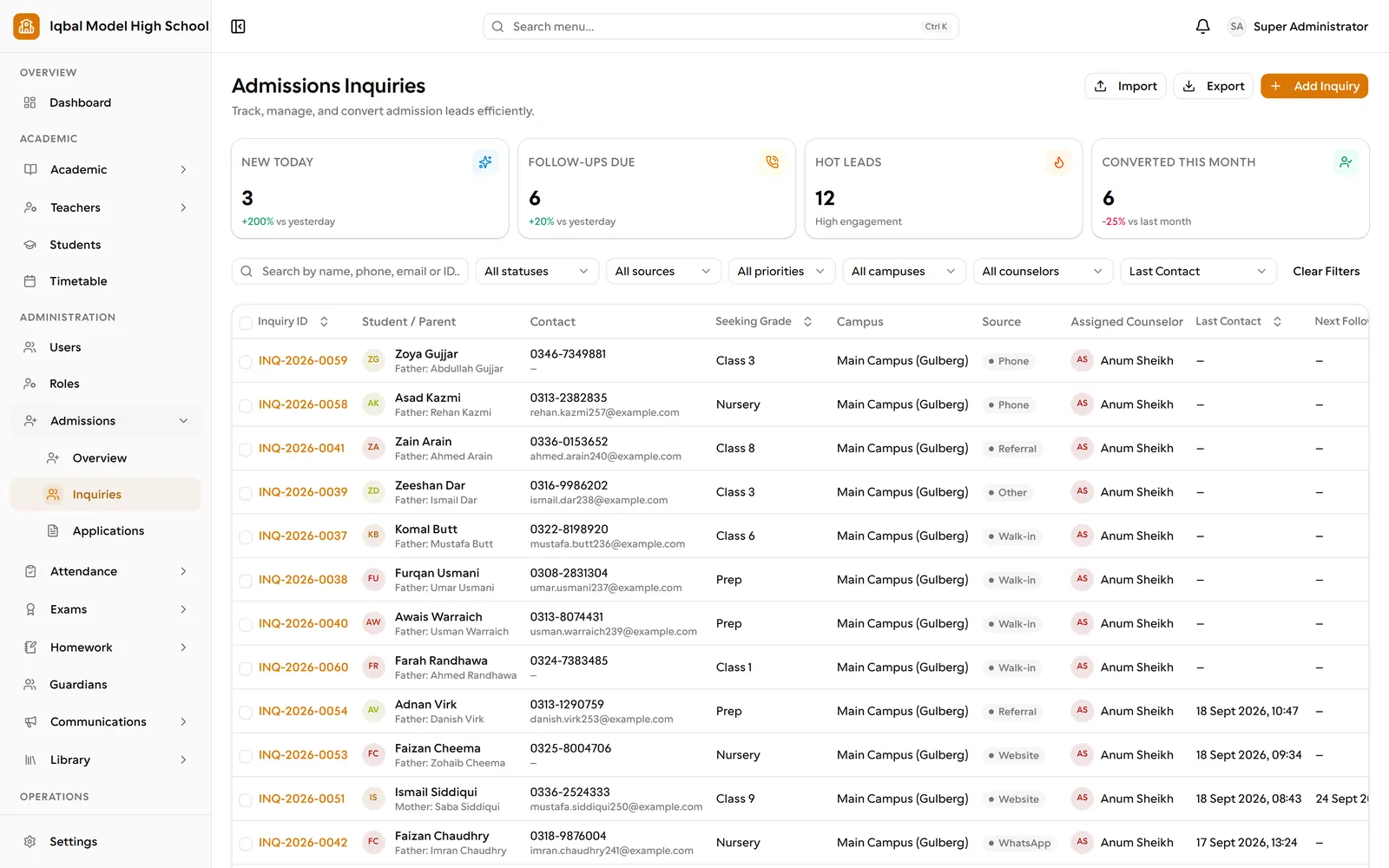
Numbered inquiries with source, priority and an assigned counselor; a follow-up timeline of calls, WhatsApp messages, visits and notes; test score and interview on the application; approve, waitlist or reject as a separate decision; and one-step enrollment that creates the student, guardians and portal accounts.
Fees billed correctly every cycle
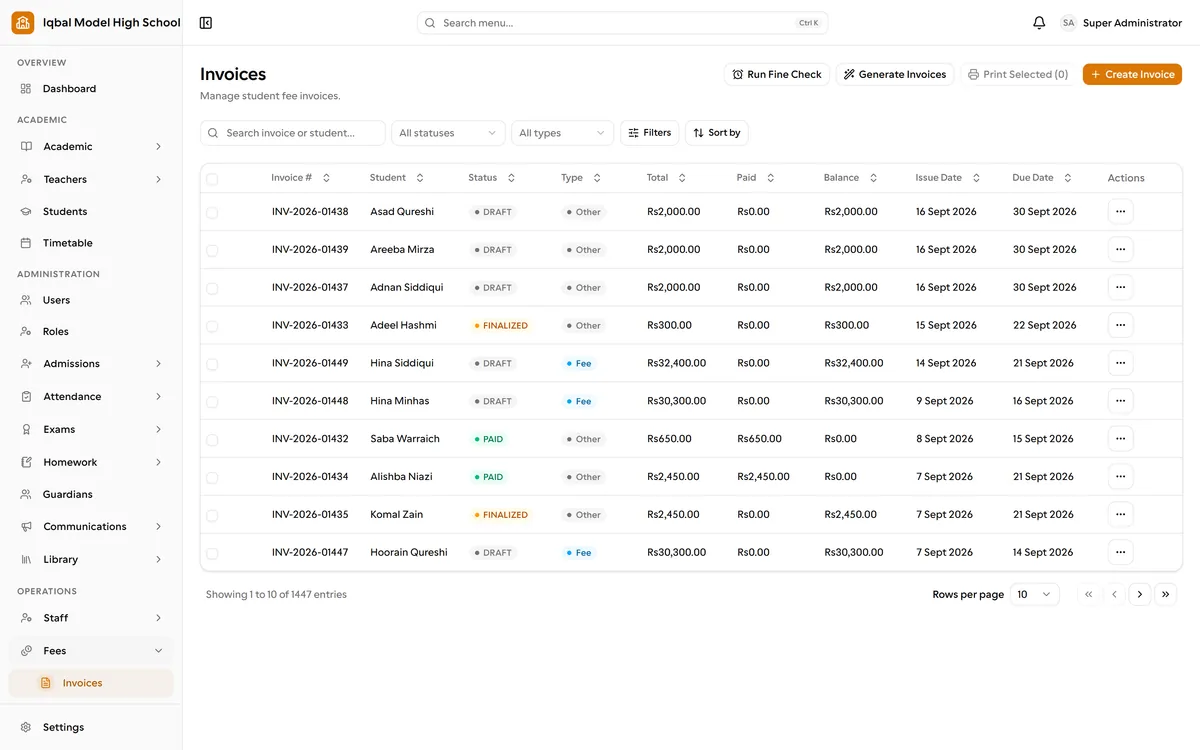
Fee plans per class with invoice preview; monthly, quarterly, annual, per-term and one-time charges billed only in the months they fall due; fixed or percentage concessions; rule-driven late fees with a cap; numbered receipts frozen at the moment of payment.
A fee position the office can trust
Nine fee reports, including outstanding balances, daily collection, demand versus collection and defaulter aging; bank-transfer proofs uploaded by parents and approved by the office; payments reversed with a reason, never deleted.
Parents reached without anyone chasing
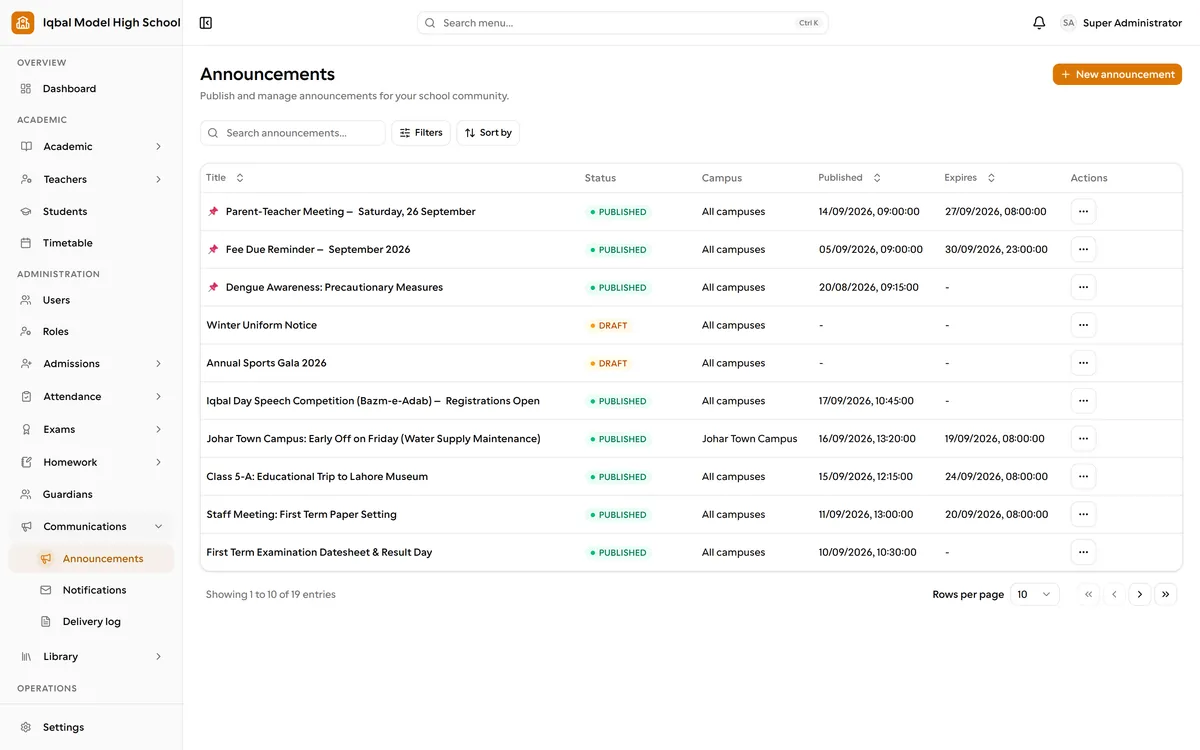
Twenty notification events by email, SMS, WhatsApp or the in-app inbox, editable templates, a delivery log, and a daily job that reminds guardians of upcoming fee due dates without sending the same reminder twice.
Payroll without month-end arguments
Shifts with grace periods and the school's own late and half-day thresholds, leave types with accrual and multi-level approval, and payroll runs that deduct unpaid absences, never penalize approved paid leave, and print numbered payslips from frozen figures.
Control over who sees what
185 individual permissions, built-in and custom roles, more than one role per person, an audit trail of sensitive actions, and each school's data scoped to that school on every request.
A start that does not take a term
Self-service signup and a three-step setup wizard that builds the academic year, classes, sections, periods and working week from regional defaults, with guided setup and data import on paid plans.
Inside EduTig
How it makes money, and who it serves
EduTig is priced per school, per month, in four tiers set by student count. Starter is free for up to 100 students, Essential is $11.99 a month for 101-350, Growth is $23.99 for 351-850, and Enterprise is $39.99 for 851 and above. Paid plans start with three days free, no card is needed to begin, and there is no setup charge. The tiers are on our pricing page and on edutig.com.
Student count is the pricing unit because it tracks both what a school can afford and how much work it puts through the system: more students means more fee revenue, more invoices and more parents. We chose tiers over a per-student rate because per-student pricing raises the bill with every admission, which charges a school for the growth it is working toward and makes the year's budget hard to fix. A band lets a school grow within it on the same invoice. The student ranges are commercial terms, not limits the software enforces, so nothing stops working mid-term when a school crosses a boundary.
What changes between tiers is support, never capability. Starter and Essential include email support, and Essential adds guided setup and data import. Growth adds onboarding sessions for staff and priority support. Enterprise adds a named contact at RNDSOL and multi-campus setup done with the school. Support is where the cost of serving a larger school sits, so support is what the price follows.
The economics follow from the architecture. EduTig is a multi-tenant cloud service: one deployment serves every school, each in its own isolated workspace with its own web address, so adding a school costs hosting and support rather than an installation visit. That is what makes a free tier and a $39.99 ceiling workable. Messaging is billed to the school by its own provider, so our revenue does not depend on how many messages a school sends, and our price stays comparable at any volume.
School owners
A bill that is published before signing and predictable for the year, the whole product from the first day, and a current view of the school in one place: outstanding fees, daily collection, payroll and expenses, with profit and loss built from them. The data stays theirs; if they leave, we export it with no exit fee.
Administrators and accounts
Invoices generated from the school's own fee rules instead of edited by hand, numbered receipts frozen at the moment of payment, bank transfers checked against the proof a parent uploads, payments reversed with a reason rather than deleted, nine fee reports, and numbered expense vouchers with an approval step. Payroll reads attendance and leave directly, so month end is a review rather than a reconstruction.
Teachers
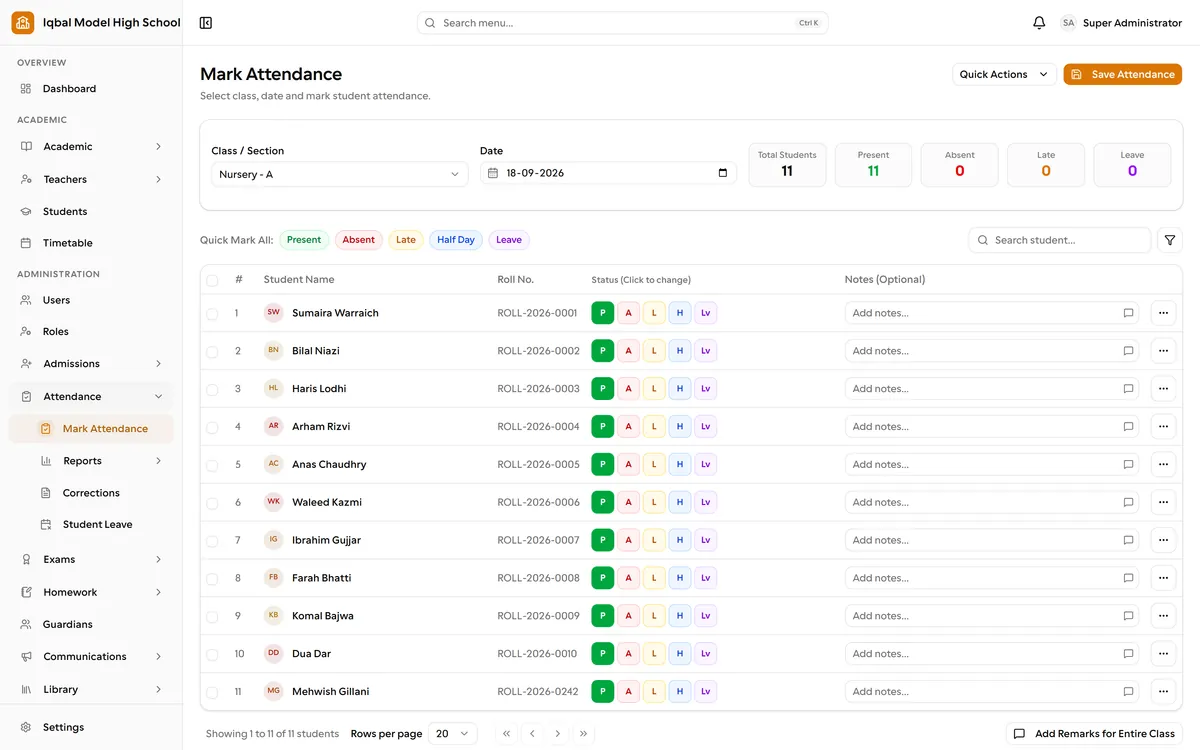
Their own portal with their timetable, attendance for their sections, homework with online submission and whole-class grading, marks entry for the subjects they teach, and student leave approvals. Parents are notified by the system, so routine updates no longer depend on a teacher's personal phone.
Parents
One account for every child, opened in any browser with nothing to install: attendance, homework, results, fees and the school's bank details, a place to upload a transfer screenshot, and leave applied from the phone. Absence alerts and fee reminders arrive on WhatsApp or SMS, the channels they already read.
Status today, and what comes next
EduTig is live at edutig.com, with four published plans from free to $39.99 per school per month. A school can sign up, create its workspace and start on Starter, or on three free days of a paid plan, without a sales call.
The product covers the school from first inquiry to payroll: 92 capabilities, five portals behind one login (administrator, teacher, office staff, student and parent), 185 individual permissions, and 20 notification events across email, SMS, WhatsApp and the in-app inbox. Each school runs in its own isolated workspace with its own branding, letterhead, numbering formats and web address. EduTig is built and supported by our team in Lahore, in the same time zone as the schools it serves.
We publish what EduTig does not do yet alongside what it does. Its financial reports cover fees, payroll and expenses, including profit and loss, but it is not a double-entry accounting system, so most schools keep their accountant's software for statutory accounts. Transport covers routes, stops and student assignments without live tracking, and documents print from the browser, which can also save a PDF. The roadmap below addresses each of these.
Next on the roadmap
- General ledger and trial balance, so statutory accounts can live inside EduTig.
- Bank reconciliation, matching a bank statement against recorded receipts instead of verifying each transfer from a parent's screenshot.
- Mobile push notifications to the phone's lock screen, alongside email, SMS, WhatsApp and the in-app inbox.
- Live vehicle tracking for school transport.
- Hostel management.
- Staff self check-in, so staff record their own attendance instead of the office entering it.
- Charts and analytics that show trends across terms and years, not only today's figures.
- A public API and webhooks, so EduTig can exchange data with a school's other systems.
- Also listed as in development on edutig.com: late fees applied on a schedule, server-generated PDF downloads, and statutory tax in payroll.
- Next.js 16 and React 19
- TypeScript
- PostgreSQL 16 with Prisma
- Auth.js
- Redis and BullMQ background jobs
- S3-compatible object storage
- Tailwind CSS and shadcn/ui
- Puppeteer
- Docker
See EduTig for yourself
EduTig is school management software in Pakistan with five portals for admins, teachers, staff, students, and parents, and a free plan for small schools.

Related reading
Student Attendance App in Pakistan: A School Guide
Have teachers mark attendance on a phone by a set cutoff and alert parents of absent children that morning. Methods, alert costs, late marks and reports.
Report Card Software for Schools in Pakistan
What report card software should do for a Pakistani school: marks entry by subject, one grading scheme, printed cards, parent access, and an audit trail.
School Fee Collection Software in Pakistan
Why fee recovery drifts in Pakistani private schools, the challan reconciliation grind, and what reminders and cycle-aware invoicing change.
Fedena Alternatives: 2026 School Software Compared
Fedena, Classe365, open source, spreadsheets, or EduTig: what each publishes about pricing as of October 2026, what's an add-on, and who shows numbers at all.
School Admission Process Checklist for Pakistan
A stage-by-stage admission process for Pakistani private schools: logging inquiries, follow-ups, tests and interviews, offers, and enrollment day.
How to Write a School WhatsApp Policy for Parents
What a school WhatsApp policy should cover: which messages go where, official numbers, reply hours, privacy rules, and what to automate. Template included.